
Reset Apple ID Password | Visit the Apple ID account page- Steps to reset your Apple ID password on your iPhone or other trusted Apple device

How to Reset Apple ID Password:

If you have forgotten your Apple ID password, you can reset it by following the instructions provided by Apple Support. The fastest and easiest way to reset your password is with your iPhone or other trusted Apple device - one that you’re already signed in to with your Apple ID, so that Apple knows it’s yours. You’ll need to have set up a passcode (or password on Mac) on your device. 

Here are the steps to reset your Apple ID password on your iPhone or other trusted Apple device:

Go to Settings.

Tap your name > Sign-In & Security > Change Password.

Follow the onscreen instructions to reset your password.

You can also follow this process on a trusted iPad or Apple Watch. To reset your password on your trusted Mac, choose Apple menu  > System Settings > your name. Then click Sign-In & Security, Change Password, and follow the onscreen instructions.

If you don’t have a trusted device, you can still reset your password on the web – but the process may take a little longer. Visit iforgot.apple.com and enter your Apple ID email address. You’ll be asked to verify your identity by answering security questions or entering a verification code sent to your trusted phone number or email address.
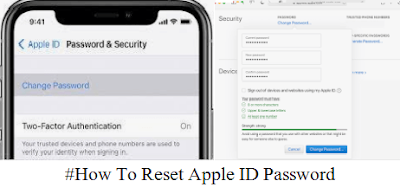
Visit the Apple ID account page- Steps to reset your Apple ID password on your iPhone or other trusted Apple device

If you need to reset your Apple ID password, you can do so through the official Apple website or through the Apple ID account page. Here are the general steps to reset your Apple ID password:

Reset Apple ID Password on Apple ID Account Page:

1. Visit the Apple ID account page:

2. Click on "Forgot Apple ID or password":

Click on the "Forgot Apple ID or password" link.

3. Enter your Apple ID:

Enter your Apple ID, which is usually your email address associated with your Apple account.

4. Verify your identity:

You'll be prompted to verify your identity. You can choose to receive a verification code through email or a text message to a trusted phone number associated with your Apple ID.

5. Enter the verification code:

Enter the verification code you receive on the website.

6. Create a new password:

After verifying your identity, you'll be prompted to create a new password for your Apple ID.

7. Confirm the new password:

Confirm the new password by entering it again.

8. Click on "Change Password":

Click on "Change Password" to update your Apple ID password.

Reset Apple ID Password on iOS Device:

If you have an iOS device linked to your Apple ID, you can also initiate the password reset process from your device:

1. Go to Settings:

Open the "Settings" app on your iOS device.

2. Tap on your name:

Tap on your name at the top of the Settings menu.

3. Select "Password & Security":

Choose "Password & Security."

4. Tap on "Change Password":

Tap on "Change Password" and follow the on-screen instructions to reset your password.

Remember to choose a strong and secure password to help protect your Apple ID. Once you've reset your password, make sure to update it on all your Apple devices and services where your Apple ID is used. If you encounter any issues during the password reset process, you can contact Apple Support for assistance.

Comments

Popular posts from this blog

Best Money Earning Apps in India 2026 – Online Jobs & Income Guide

Best Apps to Earn Money Online in India (2026 Guide) Introduction With the rapid growth of Technology and digital platforms, earning Money online in India has become easier than ever. From students to professionals, everyone is exploring online Jobs and Business opportunities using mobile apps. In this blog, we will explore the Best Apps to Earn Money Online in India , along with selection process, benefits, earning power, and latest developments. Why Choose Money Earning Apps? Online earning apps are becoming popular due to: Flexible working hours No high investment required Easy to start with basic skills Opportunity to build a scalable Business Increasing demand due to Latest Development in digital economy Best Apps to Earn Money Online in India 1. Meesho Category: Reselling Business Earn by selling products without investment Share products via WhatsApp & social media Profit margin depends on pricing Best For: Housewives, beginners, side income seekers 2. Upwork Category...

New Technology Trends That Will Change India Jobs

New Technology Trends That Will Change India: Jobs, Money, Business & Future Opportunities: India is rapidly transforming into a technology-driven economy. With the rise of AI, automation, and digital platforms, new Technology trends are not only shaping industries but also creating new Jobs , boosting Business , and opening multiple ways to earn Money . In this blog, we will explore the latest developments, future job roles, selection process, benefits, and the power these technologies hold in shaping India’s future. Introduction: Why Technology Trends Matter in India India’s digital growth is fueled by government initiatives, startups, and global investments. The integration of Technology in sectors like agriculture, healthcare, education, and finance is creating massive opportunities. These trends are directly impacting: Job creation Business growth Income opportunities Skill demand Top New Technology Trends That Will Change India 1. Artificial Intelligence (AI) & Automati...

Biography of Manohar Joshi

Biography of Manohar Joshi: Manohar Gajanan Joshi is an Indian politician who has played a significant role in Maharashtra state politics. Born on December 2, 1937, in a middle-class family in a village called Ganeshpeth in Ratnagiri district, Maharashtra, Joshi's journey into politics was marked by his association with the Shiv Sena, a right-wing regional political party in India. Joshi's political career began in the late 1960s when he joined the Shiv Sena, which was then led by its founder, Bal Thackeray. He quickly rose through the ranks of the party due to his organizational skills, dedication, and ideological alignment with the party's principles, which advocated for the interests of the Marathi-speaking population of Maharashtra. In 1972, Manohar Joshi won his first election to the Brihanmumbai Municipal Corporation (BMC), marking the beginning of his electoral career. He served as a corporator in the BMC and later became the Mayor of Mumbai in 1976. Joshi's tenu...