
MS Word References Tab | Table of Contents - Footnotes and Endnotes - Citations and Bibliography - key features available in the References tab

Using MS Word References Tab:

The "References" tab in Microsoft Word is a section of the ribbon that contains tools and features related to managing and formatting citations, creating a table of contents, adding footnotes and endnotes, and managing captions for figures and tables. 
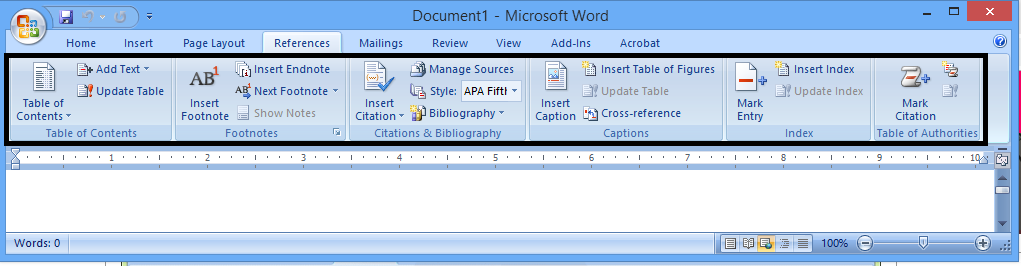
Table of Contents - Footnotes and Endnotes - Citations and Bibliography - key features available in the References tab
MS Word References Tab

Here's a brief overview of the key features available in the "References" tab:

1. Table of Contents:

Table of Contents: Allows you to insert a table of contents based on the headings in your document. You can choose from different styles and formats.

2. Footnotes and Endnotes:

Insert Footnote/Endnote: Adds a footnote or endnote at the cursor's location. Footnotes appear at the bottom of the page, while endnotes are placed at the end of the document.
Next Footnote/Endnote: Navigates to the next footnote or endnote in the document.
Convert to Footnote/Endnote: Converts selected text to a footnote or endnote.

3. Citations and Bibliography:

Insert Citation: Helps you add citations to your document using a specific citation style (e.g., APA, MLA). You can manage your sources and create a bibliography.
Manage Sources: Opens the "Source Manager," where you can add, edit, and manage your sources for citations.
Style: Allows you to change the citation style for your document.
Bibliography: Inserts a bibliography at the cursor's location based on your cited sources.

4. Captions:

Insert Caption: Adds a caption to selected items such as tables, figures, or equations.
Cross-reference: Enables you to cross-reference captions in your document. For example, you can refer to a figure by its number.

5. Indexes:

Mark Entry: Marks selected text to be included in an index. This is useful for creating an alphabetical list of terms with page numbers.
Insert Index: Inserts an index at the cursor's location based on the marked entries in the document.

6. Table of Authorities:

Mark Citation: Marks selected text as a citation to be included in a table of authorities.
Insert Table of Authorities: Inserts a table of authorities at the cursor's location.

7. Mailings (for Mail Merge):

Mail Merge: Accesses the Mail Merge feature, which is used for creating personalized documents, such as letters or envelopes.

These features in the "References" tab are particularly useful for academic and professional documents where proper citation, referencing, and document organization are essential. They help streamline the process of managing sources, creating tables of contents, and maintaining consistency in document formatting.

Comments

Popular posts from this blog

Biography of Manohar Joshi

Biography of Manohar Joshi: Manohar Gajanan Joshi is an Indian politician who has played a significant role in Maharashtra state politics. Born on December 2, 1937, in a middle-class family in a village called Ganeshpeth in Ratnagiri district, Maharashtra, Joshi's journey into politics was marked by his association with the Shiv Sena, a right-wing regional political party in India. Joshi's political career began in the late 1960s when he joined the Shiv Sena, which was then led by its founder, Bal Thackeray. He quickly rose through the ranks of the party due to his organizational skills, dedication, and ideological alignment with the party's principles, which advocated for the interests of the Marathi-speaking population of Maharashtra. In 1972, Manohar Joshi won his first election to the Brihanmumbai Municipal Corporation (BMC), marking the beginning of his electoral career. He served as a corporator in the BMC and later became the Mayor of Mumbai in 1976. Joshi's tenu...

Professor Cheiro Prophecies about India | 5 predictions Professor Kiro - Kiro made these amazing predictions for India

Professor Cheiro Prophecies:  Here is Kiro made these amazing predictions for India: Professor Kiro was born in November 1866 in England. At the age of 17, Kiro came to Mumbai and met astrologer Vednarayan Joshi. With his advice, he will reach the Himalayas, Kashmir, Ladakh and Varanasi. From here, he studied astrology extensively. Kiro made many predictions in his life, which we are giving you here. Cheiro, whose real name was William John Warner, was a prominent Irish astrologer and palmist who gained fame in the late 19th and early 20th centuries. He was known for his accurate predictions and was consulted by various prominent figures of his time, including Mark Twain, Oscar Wilde, and Thomas Edison. Cheiro also made some predictions related to India. Parada Kahanee One of his notable predictions about India was made in his book "Cheiro's World Predictions," published in 1926. In this book, he wrote about the possibility of India gaining independence from British...

Biography of Alexander Pope | Early Life and Literary Beginnings - Major Works and Personal Life - Later Years and Death of Alexander Pope

Biography of Alexander Pope: Alexander Pope (1688–1744) was an English poet, satirist, and critic of the Augustan period, best known for his satirical verse and his mastery of the heroic couplet.  Here is a brief biography of Alexander Pope: Early Life of Alexander Pope: 1. Birth: Alexander Pope was born on May 21, 1688, in London, England. 2. Health Challenges: Pope suffered from various health issues from an early age, including Pott's disease (a form of tuberculosis that affects the spine) which left him with a hunched back and stunted growth. Professor Cheiro Prophecies about India : Kiro made these amazing predictions for India Literary Beginnings: 1. Early Education: Pope was largely self-taught, having been denied formal education as a Catholic during a period of anti-Catholic sentiment in England. 2. Debut Poem: His first major work, "Pastorals," was published in 1709, and he gained recognition in literary circles. Parada Kahanee Major Works of Alexander Pope:...